
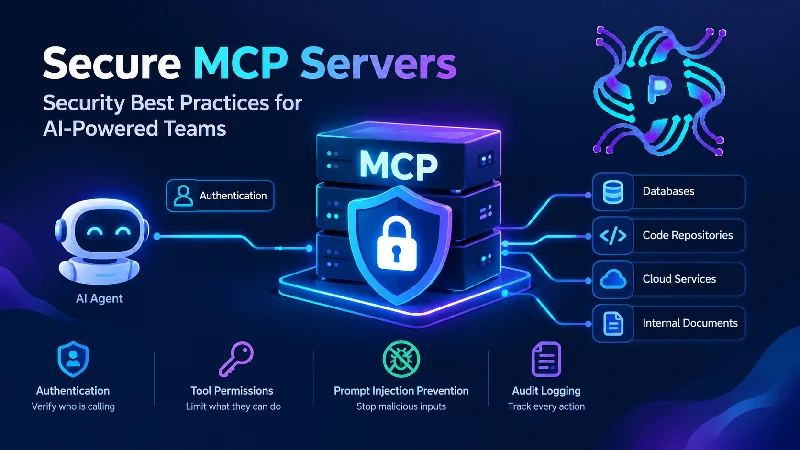
An AI assistant that can only chat is a contained risk. One that can query a production database, open tickets, read internal documents, and run scripts is a different risk. The Model Context Protocol (MCP) gives language-model applications a standard way to reach exactly those capabilities, and teams are wiring it up quickly because the productivity gains are visible right away. Security work tends to lag behind. Before an MCP server connects to anything valuable, its owners need clear answers about who can call it, what each caller may do, and how activity gets recorded. The sections below cover those questions in order, starting with what a server actually exposes.
What an MCP Server Puts Within an Agent’s Reach
An MCP server is a small service that advertises tools, resources, and prompts to an AI client. A tool might be search_tickets, run_sql_query, or deploy_service. When the model decides a tool is relevant, the client calls the server, which carries out the action using whatever credentials it holds. The server therefore acts as a bridge between probabilistic text generation and deterministic systems with real consequences.
That bridge changes the threat model in a way traditional API security only partly covers. A human clicking a button makes a deliberate choice. A model selects a tool based on text it has read, and some of that text may come from untrusted sources such as web pages, emails, or customer-uploaded documents. An attacker who plants instructions in such content can attempt to steer the agent toward actions the user never intended, a technique known as prompt injection.
Deployment shape matters too. Local servers launched by a developer’s IDE inherit that developer’s environment variables and file access. Remote servers sit on a network and serve many users. Each model carries different risks, and the controls below apply to both, with extra weight on remote setups that multiple people share.
Scale amplifies these concerns. One team may begin with a single server wrapping a ticketing system, then add connectors for source control, cloud consoles, and customer databases over a few months. Each addition widens what a manipulated or misconfigured agent could reach, and the person who approved the first server may not know about the sixth. Tracking an inventory of servers, owners, and connected systems from the start keeps that growth visible.
Authentication: Establishing Who Is Calling
Every request to an MCP server should be tied to a known identity. Servers reachable over HTTP have an established answer in OAuth-based flows, and the protocol’s authorization guidance builds on OAuth for exactly this reason. The server validates a token, checks that it was issued for this particular server, and rejects anything else. Static API keys pasted into configuration files are the weakest option, since they never expire, spread easily through chat and repositories, and identify no one in particular.
Local servers need attention as well. A server that listens on a localhost port without authentication can be reached by any process on the machine, and in some cases by web pages through the browser. Binding to a Unix socket or requiring a token even for local calls closes that gap.
Two habits prevent common mistakes. First, avoid passing a user’s token straight to downstream systems; the server should hold its own narrowly scoped credentials or deliberately exchange tokens, otherwise it becomes a confused deputy that lends its privileges to whoever asks. Second, keep credentials short-lived and tied to individuals, so that a leak expires quickly and logs show which person’s session performed an action. Rotating signing keys and token secrets on a schedule, and revoking access promptly when someone changes roles, keeps the identity layer trustworthy over time.
Authorization and Tool Permissions
Authentication says who is calling, and authorization decides what they may do. For teams trying to secure MCP servers, this is where most of the practical work happens. Broad, all-or-nothing access, where any connected client can invoke any tool, mirrors the standing-privilege problem that plagues infrastructure generally.
Permissions work best when attached to the tool and the caller together. A support engineer might use a read-only ticket search tool, while only a release manager can invoke a deployment tool, and only against staging unless a second approval exists. Splitting one flexible tool into several narrow ones usually helps, because a generic run_sql tool is far harder to constrain than three tools that each run a fixed, parameterized query.
A simple tiering approach helps teams decide where to put effort:
- Read-only tools over low-sensitivity data can run without prompts.
- Tools that read sensitive data should require a scoped identity and be logged in detail.
- Tools that change state should need explicit user confirmation shown outside the model’s own output.
- Destructive or irreversible tools, such as deletions or production deployments, should require human approval or stay out of the agent’s reach entirely.
The confirmation step deserves extra attention. A prompt rendered by the client, showing the exact parameters, is more trustworthy than a model’s own summary of what it plans to do.
Exposing Internal Systems to Agents Without Losing Control
Connecting an agent to internal systems multiplies the consequences of any single weakness. A server with network access to a data warehouse, a code repository, and a secrets manager becomes a high-value target. Teams hoping to secure MCP servers properly should treat each one like any other privileged service: minimal network access, isolated runtime, dedicated service accounts, and no ambient credentials.
Several attack patterns deserve specific planning. Tool poisoning hides malicious instructions inside a tool’s description, which the model reads but the user rarely sees. Indirect prompt injection arrives through data the tool returns, such as a document that says to forward files elsewhere. Overly helpful tools that accept arbitrary shell commands or file paths invite path traversal and command injection, just as any web endpoint would.
Mitigations are mostly familiar engineering. Validate and sanitize every input, restrict file access to defined directories, limit outbound network calls from the server, and pin or review third-party servers before installing them. Community-built servers deserve the same scrutiny as any dependency, since they run with real credentials. Segment servers by sensitivity, rather than hosting one that reaches everything, to keep a compromise from spreading.
Audit Logging and Ongoing Monitoring
Logs turn an opaque agent session into something reviewable. Each tool call should record the authenticated user, the client, the tool name, the parameters, the result status, and a timestamp. Where possible, include a correlation identifier linking the call to the conversation that triggered it, since investigators will want to know what prompt led to a particular action.
Storage deserves thought. Sensitive parameters may contain customer data or secrets, so logs should redact or hash those fields while retaining enough detail to reconstruct events. Ship records to a central system the MCP server itself cannot modify.
Monitoring then adds value on top. Useful signals include sudden spikes in call volume, a tool being used by someone who has never touched it before, repeated authorization failures, and access to unusually large result sets. Rate limits provide a second layer, capping how much damage a runaway or hijacked agent can do before a human notices. Periodic reviews of which tools exist, who holds access, and which servers remain in use keep the setup from drifting into the sprawl that audit logs were meant to reveal.
Incident readiness belongs here as well. Teams should decide in advance how to quickly disable a single tool or an entire server, how to revoke tokens issued to an agent, and who gets paged when anomalous activity appears. A kill switch that exists only in theory helps little at three in the morning, so rehearsing the shutdown path once with a realistic scenario exposes gaps in ownership and tooling.
READ: Tech Trends PboxComputers | Top Tech Innovations Shaping the Future
End Note
MCP gives AI tools direct access to real systems, so teams must apply security best practices to protect against callers manipulated by malicious text. Authenticate every request, scope permissions narrowly per tool, require confirmation for actions that change state, isolate servers from one another, and log every call in a place the server cannot alter.
Teams that put these controls in before the first production connection avoid the harder task of retrofitting them after an incident. Starting small, with read-only tools and a short list of users, leaves room to expand access as trust and visibility grow.